Most traders don't lose on strategy. They lose on the days they break their own rules.
Daily Edge is a tiny trading journal you open once a day. Write your plan, tick your rules, log trades, keep your streak alive. After a few weeks it shows you, in your own numbers, what breaking your rules costs per trade. Runs in your browser, works offline, installs like an app. No account, and your data never leaves your device.

See Daily Edge in 30 seconds
The number it's built to show you
Pro splits your results into days you kept every rule and days you didn't. In the bundled demo data, rule-keeping days earn about $13 per trade and rule-breaking days about $1.50. Load the demo in the app and see the gap yourself, then start logging your own days.
What you get
Daily check-in
Plan, rules checklist, mood, trades, lesson. About 60 seconds.
Streaks
Check-in streak, disciplined-day streak, best streak, 12-week heatmap.
Offline & private
Installable PWA, no server, no account. Data stays in your browser.
Charts (new)
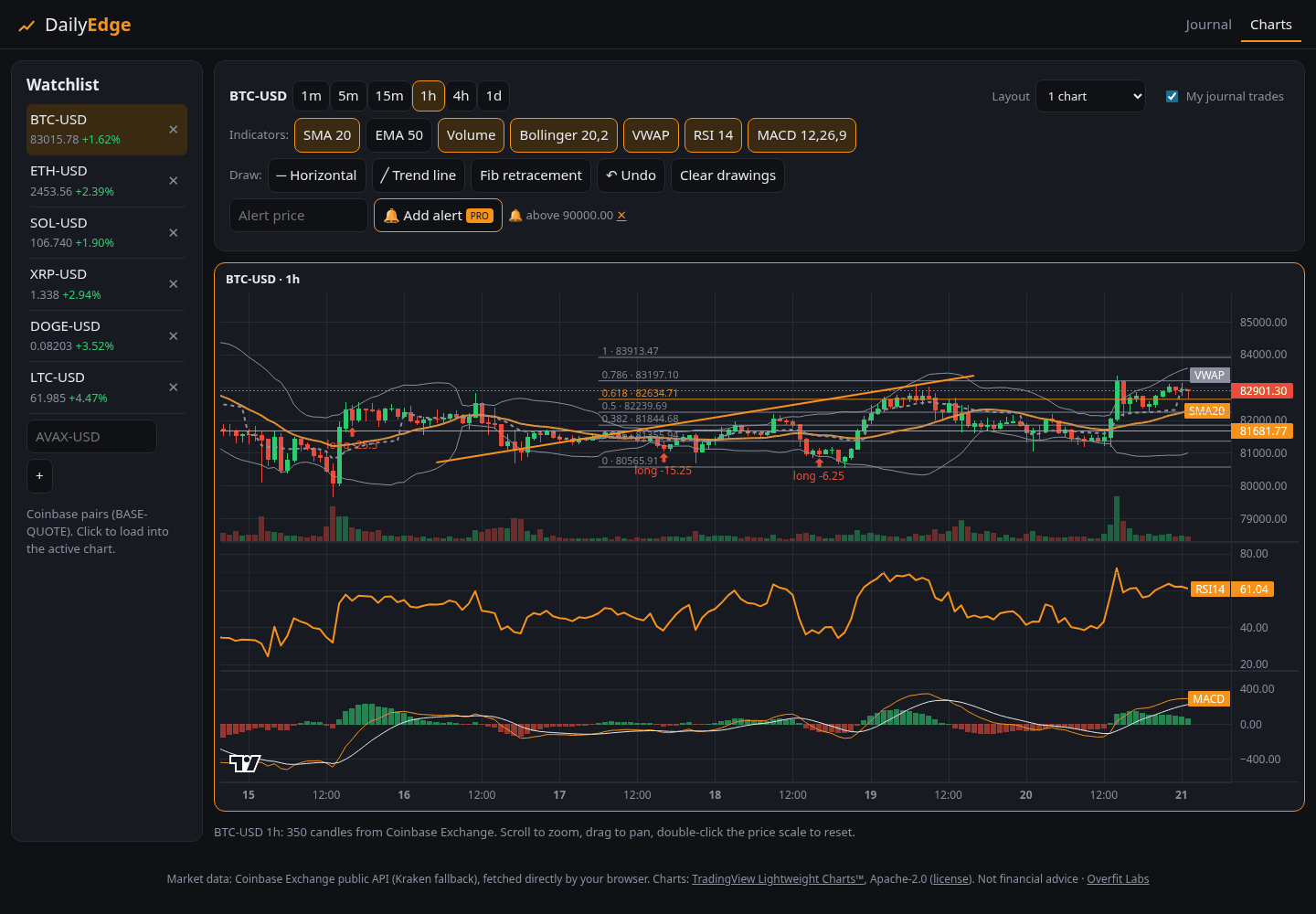
Live crypto candles from Coinbase (Kraken fallback): 1m–1d, zoom/pan, volume, watchlist with 24h change, saved layout.
Your trades on the chart
Journal trades show up as arrows on the matching day's bar, green for wins and red for losses.
Charts Pro
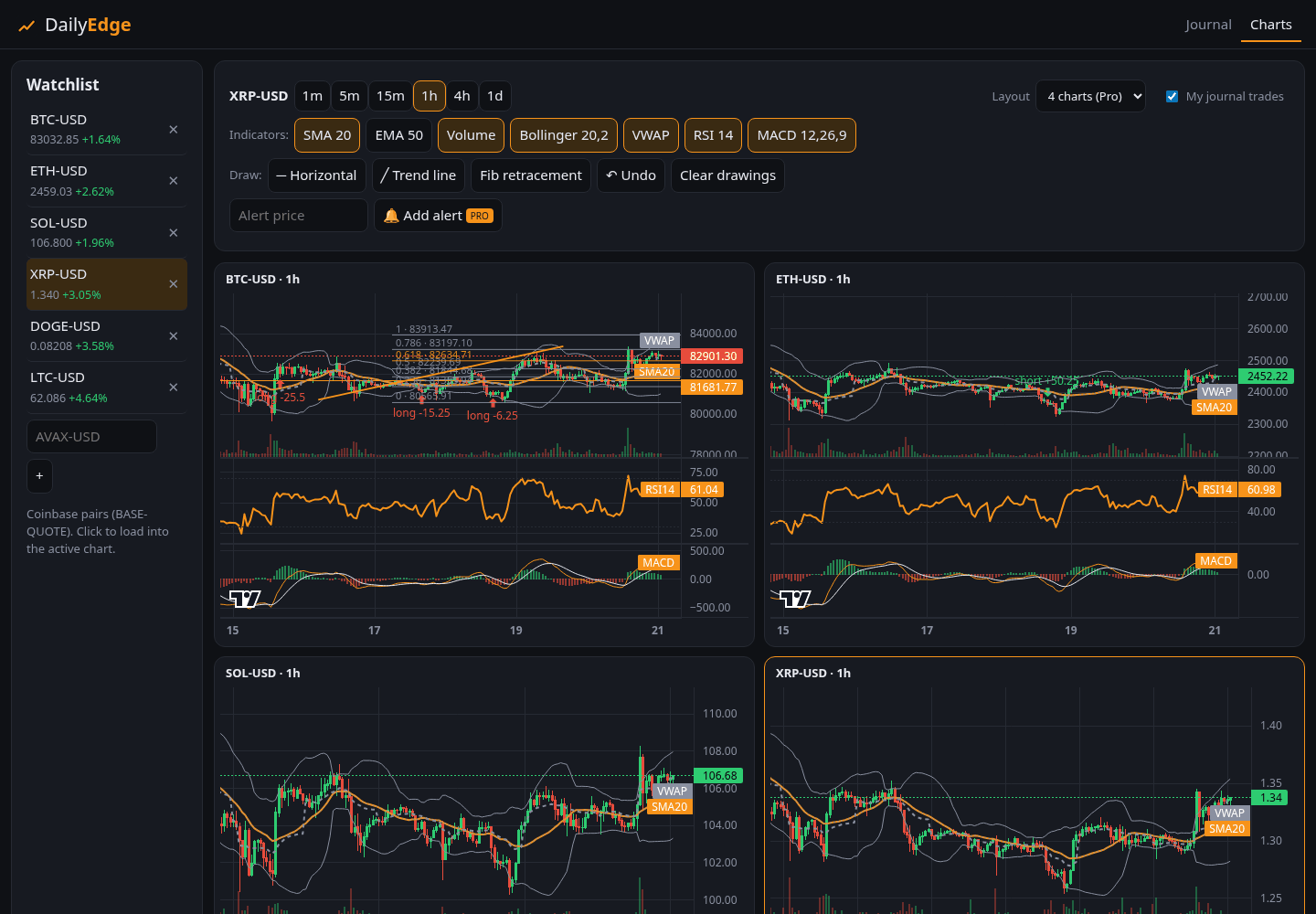
Bollinger, VWAP, RSI, MACD, trend lines, fib retracements, 2- and 4-chart layouts, price alerts while the tab is open.
Paper trading (new)
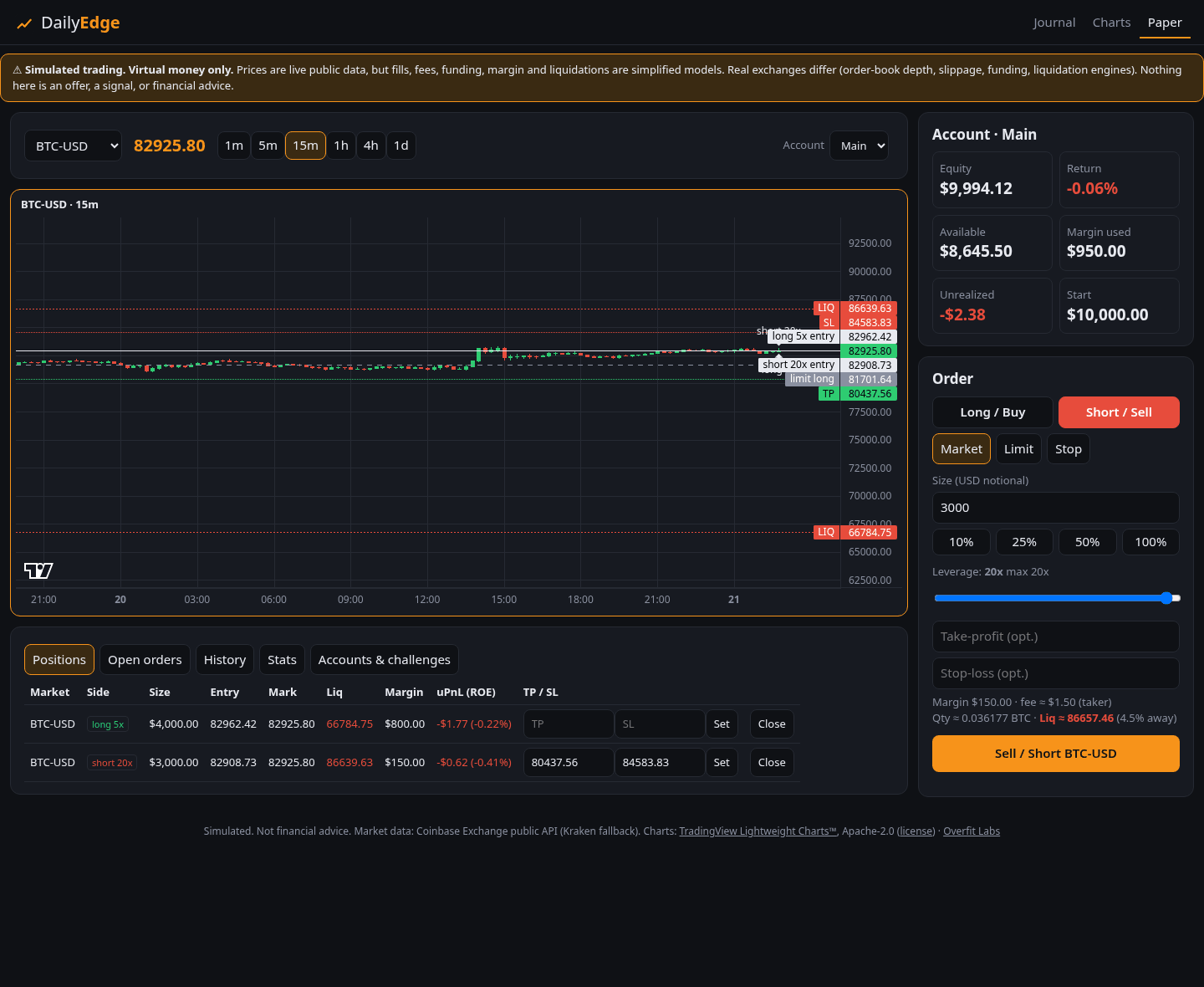
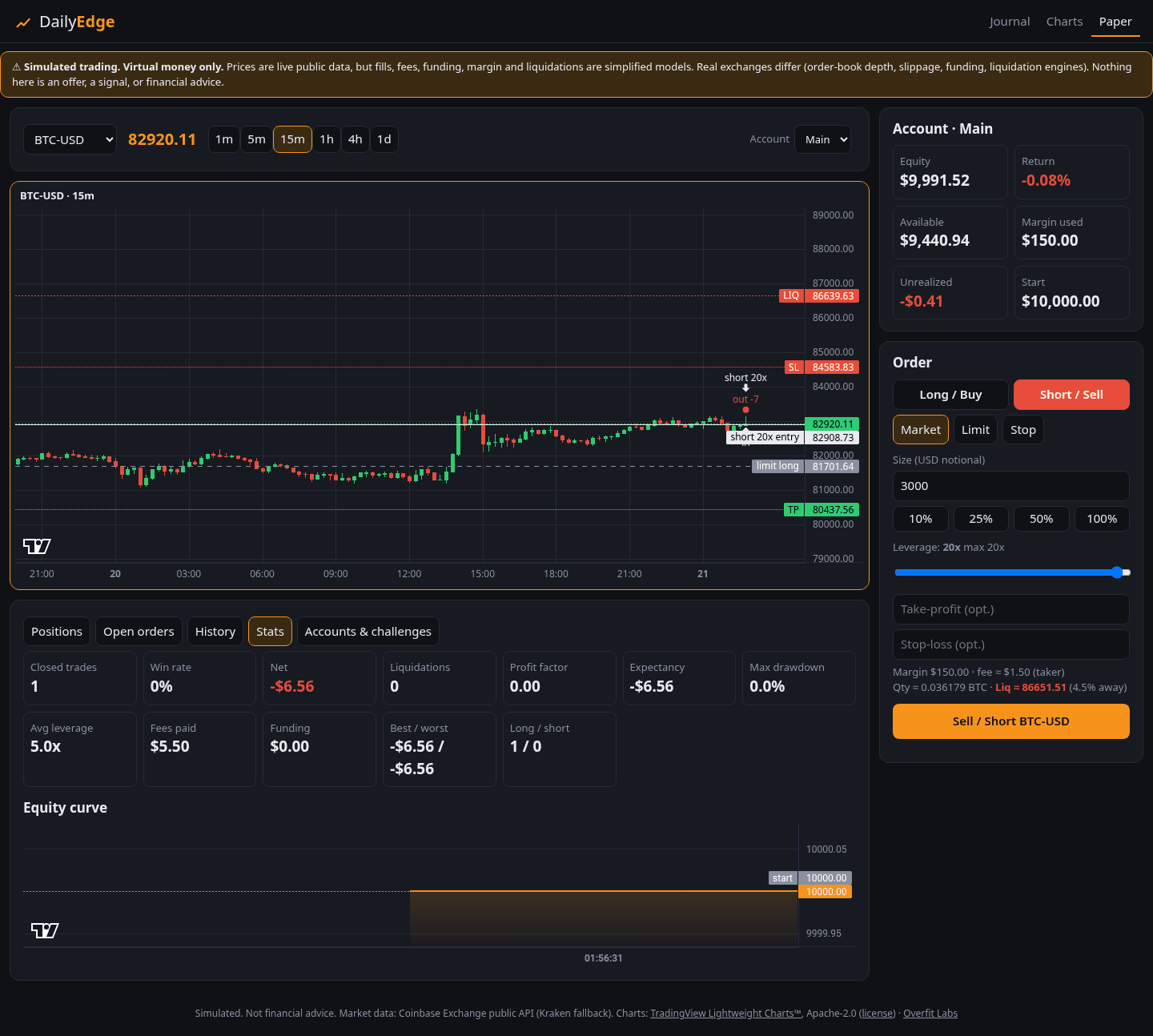
Practice with a virtual balance: market, limit and stop orders, long and short, TP/SL, margin, liquidation price, maker/taker fees, optional funding. Simulated, not advice.
Paper → journal
Closed paper trades land in your journal tagged PAPER and are kept out of your real stats.
Share cards & challenge links (new)
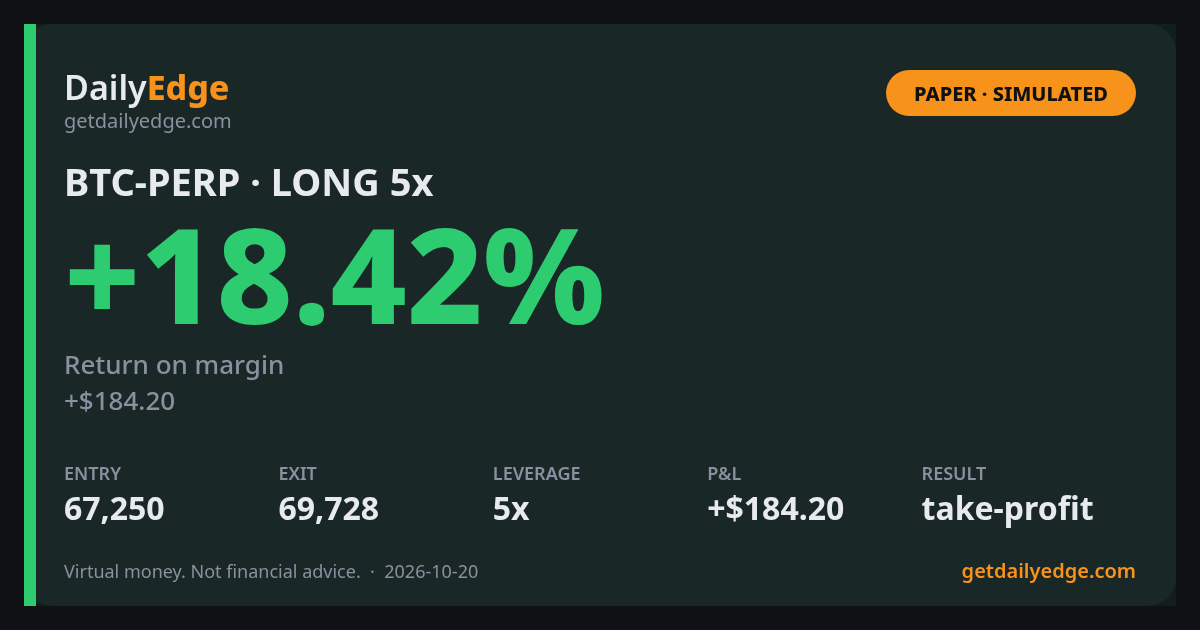
Turn a paper trade, account or challenge into a branded PNG card clearly marked PAPER · SIMULATED, with an option to hide dollar amounts. Send friends a link that starts the same challenge.
Portfolio tracker (new)
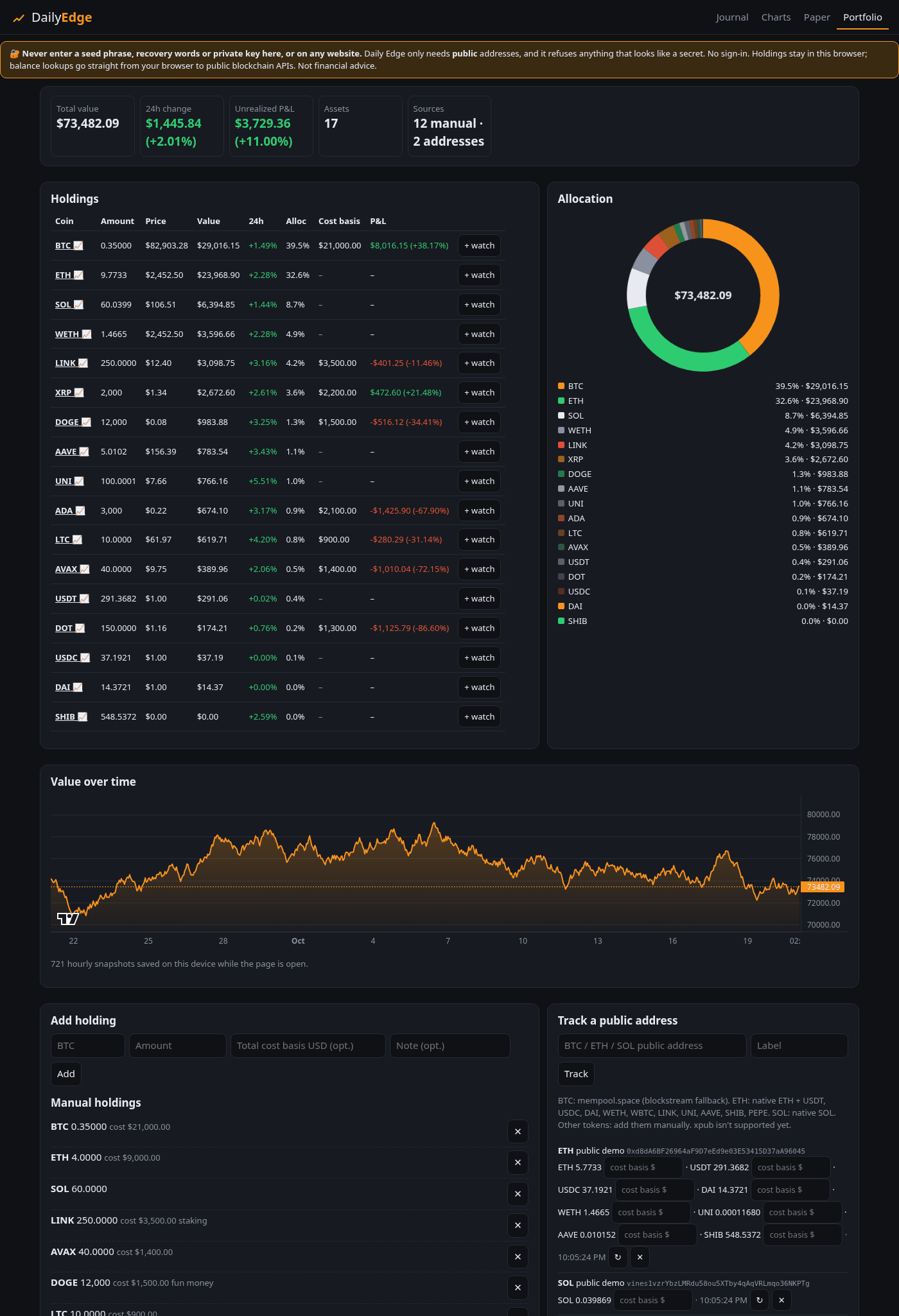
Add holdings by hand or paste PUBLIC BTC, ETH (+10 major ERC-20s) or SOL addresses. Live value, allocation, 24h change, P&L vs cost basis, value over time. One click to chart or watchlist.
Never your keys
No sign-in, no seed phrases, no private keys. It refuses anything that looks like a secret. Data stays on your device.
Mistake tags
Tag a trade FOMO entry, moved stop, oversized and more. See how often each happens and what a tagged trade costs vs a clean one; Pro adds a per-tag P&L table.
Discipline dividend (Pro)
Expectancy and win rate on rule-keeping vs rule-breaking days.
Analytics (Pro)
Equity curve, profit factor, expectancy, avg R, drawdown, by-setup and by-mood breakdowns.
Export & themes (Pro)
CSV export, JSON backup/restore, unlimited rules & history, 4 themes.
Trading tools
Position size & risk calculator (free) and a DCA simulator on real prices (1 year free, 5 years + CSV with Pro).
Market mood & alerts
Live Fear & Greed and funding rates (OKX, Hyperliquid), plus price, 24h-move and Fear & Greed alerts while the tab is open. 3 free alerts; Pro: unlimited, repeating and a year of history.
Trade review & P&L export
Daily P&L heatmap with weekday and symbol breakdowns (12 weeks free, a year with Pro), and a Pro CSV of realized P&L from journal and paper trades for your records. Not tax advice.
Exchange CSV import (new)
Import spot trades from a Coinbase, Kraken or Binance CSV: partial fills grouped, FIFO round trips, fees included, preview before anything is added. Read on your device, no API keys. 25 newest trades per file free, all with Pro.
Screenshots


Free vs Pro
| Free | Pro ($9 once) | |
|---|---|---|
| Daily check-in, trades, streaks, heatmap | ✓ | ✓ |
| Rules | 3 | unlimited |
| History & stats window | last 30 days | everything |
| Win rate & net P&L | ✓ | ✓ |
| Charts: candles, timeframes, volume, watchlist, journal marks | ✓ | ✓ |
| Chart indicators | SMA, EMA, volume | + Bollinger, VWAP, RSI, MACD |
| Drawings | horizontal lines | + trend lines, fib retracements |
| Multi-chart layouts & price alerts | ✓ (2 or 4 charts) | |
| Paper trading: virtual balance, market/limit/stop, long/short, liquidations | ✓ (1 account) | ✓ |
| Paper leverage | up to 5x | up to 20x |
| Multiple paper accounts & challenges, detailed paper stats | ✓ | |
| Paper share cards & challenge links | ✓ Classic style | + Bold, Minimal, Square |
| Portfolio: live value, allocation, 24h change, P&L (in USD or BTC) | ✓ | ✓ |
| Holdings / tracked public addresses | 10 / 1 | unlimited |
| Portfolio history, CSV import & export | last 24h | full history + CSV |
| Exchange CSV import (Coinbase, Kraken, Binance) | 25 newest trades per file | all trades |
| Mistake tags: how often, clean vs tagged trades | ✓ | + per-tag P&L table |
| Discipline dividend, equity curve, setup & mood breakdown | ✓ | |
| CSV export, JSON backup | ✓ | |
| Themes | dark | dark · light · matrix · ocean |
Open Daily Edge (free)
No signup. Bookmark it or use your browser's Install / Add to Home Screen. Try 'Load demo data' in Settings to look around.
Open the app works offline after first loadFree calculators, no signup: Crypto trading fee calculator · Break-even price calculator · Crypto profit calculator · Risk of ruin calculator
Buy Daily Edge Pro
You get a license key on this page right after a card payment (with bitcoin, after 1 confirmation). It unlocks Pro in the app on all your devices.
Secure checkout by Stripe · One-time payment, no subscription
- Card payments run on Stripe's checkout, so we never see your card number.
- Digital goods are final sale, so try Pro free for 7 days first (in the app: Journal → Settings).
- No account needed. Daily Edge's free tools keep your trades in your browser; we never see them.
- Made by Overfit Labs: who we are · what's new · support@getdailyedge.com
Compare plans · or get it in the Everything bundle ($22 for 3 products)
One-time payment by card or bitcoin. No account needed.
Quote ready — pay the exact amount below
If no wallet opens, copy the address and amount into your wallet app.
Same address is listed in the FAQ and our Nostr profile. This quote was verified as signed by our shop key.
Save your order ID and claim key. They're stored in this browser, but they are the only way to recover your purchase on another device. all details.
Send the exact amount in one payment. Network fees are paid by you. Digital goods are final sale.
Paying with bitcoin? How it works:
- Get a live quote: an exact sat amount, an order ID and a secret claim key. Valid 30 minutes. Don't send anything before you see it.
- Send exactly that amount to the address shown, in one payment.
- Keep this page open, or come back later. After 1 confirmation your license key appears right here.
Honest note on timing
Quotes (the exact amount and address) come from an always-on server and appear within seconds. Matching your payment and delivering your purchase run on a small machine of ours that isn't always online. If it is, your key or download arrives once it is back, which can take a few hours. Your order is saved in this browser, so you can close this page and come back.
Recover my order
Paste the order ID and claim key you saved.
FAQ
More answers in the full FAQ and the Help guide.
Yes. Tap 'Try Pro free for 7 days' (in Journal → Settings or on any Pro note). It unlocks every Pro feature on this device for 7 days with no payment and no sign-up; a small badge shows the days left. When the trial ends nothing is deleted, Pro-only features simply go back to the free limits, and you can keep Pro for $9 once, by card or bitcoin.
See the Plans page (getdailyedge.com/plans/): Free, each paid product and the Everything bundle side by side, with the limits the app actually uses. Every purchase is a one-time payment (card or bitcoin), never a subscription. Daily Edge Pro is $9. The Everything bundle is $22 for the Pro key plus Crypto Backtest Toolkit Pro and the latest Agent-Economy Weekly full edition, $4 less than buying them separately.
Everything (journal, paper accounts, chart layouts, portfolio) is stored in your browser's local storage on this device. There's no account and no server of ours involved, so we never see it. Clearing your browser data erases it, so keep backups. We do count anonymous page views; see "Do you use analytics or tracking?".
Only anonymous, cookie-less counts via GoatCounter: which page was viewed, the referring site, screen width, how far pages are scrolled, time on page and clicks on main links. If you arrive through one of our tagged links, we also record that link's tag (only the utm_source, utm_campaign and utm_content values, e.g. "nostr" and "dca") to see which post brought visitors; nothing else from the address is sent. No cookies, no IDs stored in your browser, no ad trackers, and never anything you type: journal, trades, addresses and portfolio stay on your device. Do Not Track and Global Privacy Control are respected.
Pay on the shop page by card or bitcoin. Your license key appears on screen (right after a card payment, or after 1 confirmation for bitcoin), with a button that unlocks the app. The key is checked offline with a signature, with no account and no server.
Open Daily Edge there, go to Journal → Settings, paste the same license key and tap Unlock. It works on all your own devices. Save the key somewhere safe, like a password manager.
Use 'Recover my order' on the shop page with your order ID and claim key, and the key appears again. Then save it somewhere safe, like a password manager. It works on all your devices.
By card or bitcoin, with no account. Card payments run on Stripe's secure checkout, so we never see your card number. Your key appears right after a card payment. With bitcoin you pay an exact amount on-chain to the address shown, and the shop's checkout watches the blockchain for it. Always pay the exact amount shown, because the extra sats identify your order. Quotes expire, so pay within the time window.
Our only bitcoin payment address is 1MVAKAcfvPNSyxW9Pa7zdn7SQn5xTqhCKu. You can check it three ways: it is in this FAQ; it is in our Nostr profile (npub16lgpp5erwwfrwdur0sjashuessfg28mlf8c0uruq06ah2ag26x5sm7vd7g), which you can look up in any Nostr app or on any relay, independent of this website; and the checkout itself refuses any quote that isn't signed by that shop key or that names a different address. If a page ever shows you another address, don't pay it. Our official web address is getdailyedge.com, which serves the app directly from our nsite. The address npub16lgpp5…7vd7g.nsite.lol is a backup that serves the same site. Saved data stays in the browser at the address where you created it.
With a card, your key appears right after the payment goes through. With bitcoin it takes longer: quotes (the exact bitcoin amount and address) come from an always-on server, so they appear within seconds. Matching your payment and sending your license key run on a small machine of ours that is sometimes offline. Your key appears on the same page after 1 network confirmation (about 10 minutes on average, sometimes longer). If that machine was offline, it arrives once it is back, which can take a few hours. Never send bitcoin before you see a quote. Your order is saved in your browser, so you can close the page and come back.
No. It's a simulator with virtual money. Prices are live public data, but fills, fees, funding and liquidations are simplified models, and real exchanges behave differently. It's for practice only, not financial advice.
Never. Nobody legitimate ever does. The portfolio only takes public addresses, which can't move funds, and it refuses seed phrases and private keys. Balances are fetched straight from your browser to public APIs (mempool.space, blockstream.info, publicnode.com).
Your browser fetches market and balance data directly, with no key and nothing passing through us. Candles and prices come from Coinbase Exchange (Kraken as fallback). The coin ticker on the getdailyedge.com home page also asks Coinbase Exchange for prices, straight from your browser, with no key and no tracking. BTC balances come from mempool.space (blockstream.info as fallback), and ETH and SOL from publicnode.com. News headlines are a separate static feed.json built from free public RSS (title/link/time/source only); see "Where do the News headlines come from?".
Yes, after the first visit: the journal works fully offline, and you can install it with your browser's Install / Add to Home Screen. Charts, paper trading, portfolio balances and the News feed need internet for live data.
The core app is free, so try before you buy. Pro sales are final.
Yes, if you'd like to: use the 'Tip with bitcoin (optional)' link in the shop footer, which shows a bitcoin address and QR code (on-chain only). Tips are completely optional and unlock nothing; everything free stays free.
No. It's a journal and a practice tool. It only shows statistics of what you logged or simulated.
Card payments are processed securely by Stripe; bitcoin payments go directly to a self-custody address; no accounts, no tracking cookies (anonymous page counts only).